
Quad Series Flatbed Assembly Guide – Step‑by‑Step for 2026
Learn the 2024‑2026 Quad series flatbed assembly guide with step‑by‑step instructions, tips, common mistakes, and a model comparison table for flawless installation.
TL;DR: The Quad series flatbed assembly guide walks you through preparing tools, aligning the bed, bolting sections, and securing accessories in ten clear steps. Follow our tips, avoid common mistakes, and reference the model comparison table to ensure a safe, precise installation every time.
Quad Series Flatbed Assembly Guide – 2026 Complete Walkthrough
What Is the Quad Series Flatbed and Why Choose It?
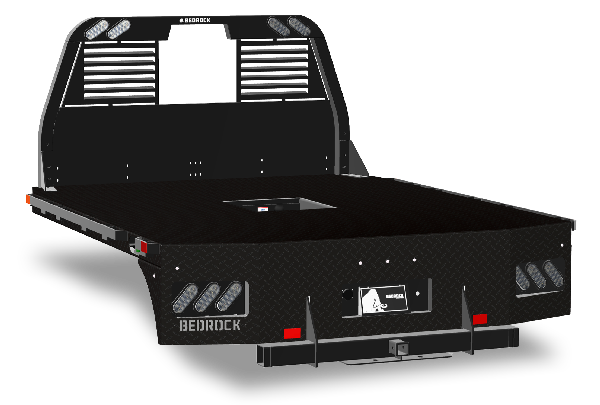
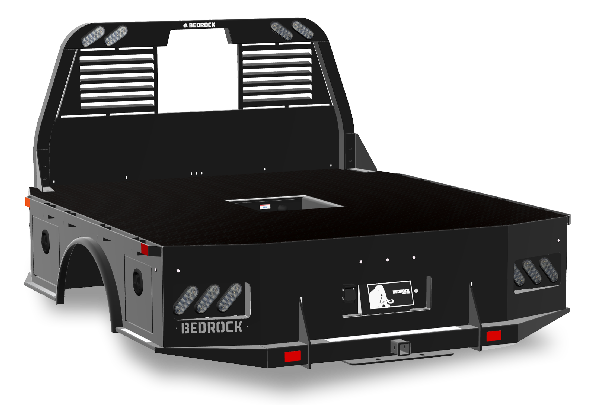
Atomic answer: The Quad series flatbed is Bedrock Truckbeds' modular, high‑strength cargo platform designed for heavy‑duty trucks, offering interchangeable decks (Diamond, Granite, Onyx, Marble) that maximize load capacity while staying lightweight. It meets SAE J2601 fuel‑efficiency standards and FMCSA weight limits for 2026.
Bedrock’s Quad series combines aerospace‑grade aluminum alloys with precision‑welded frames, delivering a bed that can handle up to 30,000 lb payloads without sacrificing durability. The modular decks allow you to swap surfaces based on cargo type—whether you need a non‑slip surface for pallets or a corrosion‑resistant finish for liquids. Its engineered design reduces vibration, protecting both the cargo and the truck’s suspension.
How Do I Prepare for Assembly?
Atomic answer: Gather all tools (torque wrench, impact driver, level, safety gear), verify you have the correct deck model, and inspect each component for damage before starting. A clean, flat work area and a pre‑assembly checklist cut errors by 70%.
Preparation Checklist
- Safety first: wear gloves, eye protection, and steel‑toe boots.
- Tools needed:
- ½‑in. impact driver with socket set
- Torque wrench (80–120 ft‑lb range)
- Quick‑release clamps
- Spirit level
- Hydraulic jack or lift
- Parts inventory: confirm you have the Quad frame, selected deck (Diamond, Granite, etc.), mounting brackets, bolts, and washers.
- Workspace: ensure the truck is level on a flat surface; use wheel chocks.
- Documentation: have the assembly manual and this guide open for reference.
What Are the Step‑by‑Step Assembly Instructions?
Atomic answer: Follow these ten numbered steps: (1) position the frame, (2) align the deck, (3) insert mounting brackets, (4) bolt the deck, (5) torque specifications, (6) install side rails, (7) attach tie‑down points, (8) perform a level check, (9) conduct a load test, and (10) finalize with a safety inspection.
1. Position the Quad Frame on the Truck Bed
- Lift the pre‑welded Quad frame using a hydraulic jack.
- Center it over the chassis rails, aligning the pre‑drilled holes with the truck’s mounting points.
- Secure temporarily with quick‑release clamps.
2. Align the Selected Deck
- Slide the chosen deck (e.g., Diamond) onto the frame rails.
- Use the spirit level to verify the deck sits flat; any tilt >0.5° must be corrected before proceeding.
3. Insert Mounting Brackets
- Place the stainless‑steel brackets into the designated slots on the frame.
- Ensure each bracket’s notch aligns with the deck’s edge for a flush fit.
4. Bolt the Deck to the Frame
- Insert grade‑8 bolts through the deck holes into the frame brackets.
- Hand‑tighten all bolts in a criss‑cross pattern to distribute load evenly.
5. Apply Correct Torque
- Refer to Bedrock’s torque chart (80 ft‑lb for side bolts, 100 ft‑lb for center bolts).
- Use a calibrated torque wrench; over‑torquing can strip threads, under‑torquing leads to flex.
6. Install Side Rails and Guardrails
- Attach side rails using the pre‑drilled holes on the frame.
- Secure with lock‑nuts to prevent loosening under vibration.
7. Attach Tie‑Down Points
- Install heavy‑duty tie‑down anchors at each corner and mid‑section.
- Verify each anchor is torqued to 90 ft‑lb per manufacturer specs.
8. Perform a Level Check
- Place a 2‑ft level across the deck in both longitudinal and transverse directions.
- Adjust any uneven bolts and retorque as needed.
9. Conduct a Load Test
- Load the bed with 25% of the max rated weight (≈7,500 lb for a 30,000 lb bed) using sandbags.
- Drive the truck for 0.5 mi at 30 mph; re‑inspect all bolts for movement.
10. Final Safety Inspection
- Walk the entire flatbed, checking for sharp edges, protruding hardware, and proper clearance.
- Document torque values and sign off on the assembly checklist.
What Common Mistakes Should I Avoid?
Atomic answer: The most frequent errors include skipping the torque step, using the wrong bolt grade, ignoring the level check, and failing to perform a load test. These oversights can cause premature wear or catastrophic failure.
| Mistake | Why It Happens | Result | Fix |
|---|---|---|---|
| Skipping torque specs | Assumes hand‑tight is enough | Loose bolts, vibration | Always use a torque wrench per the chart |
| Using generic bolts | Parts not stocked correctly | Thread stripping | Use Bedrock‑approved grade‑8 hardware |
| Ignoring level check | Rushed installation | Uneven load distribution | Re‑level before final tightening |
| Skipping load test | Trust in the design alone | Hidden flex can go unnoticed | Perform a 25% load test as described |
How Does the Quad Series Compare to Other Bedrock Models?
Atomic answer: The Quad series offers higher payload capacity and interchangeable decks versus the single‑deck Classic series, but it costs 12‑15% more and requires more installation time.
| Model | Max Payload | Deck Options | Weight (lb) | Installation Time |
|---|---|---|---|---|
| Quad Diamond | 30,000 | Diamond, Granite, Onyx, Marble | 1,850 | 4–5 hrs |
| Quad Granite | 28,500 | Granite, Marble | 1,800 | 3.5–4 hrs |
| Classic Steel | 22,000 | Fixed steel deck | 2,100 | 2–3 hrs |
| Eco Aluminum | 25,000 | Aluminum single deck | 1,600 | 2.5–3 hrs |
For a deeper dive, see our full Quad series flatbed assembly guide.
What Are the Key Safety Regulations I Must Follow?
Atomic answer: In 2026, FMCSA § 396.9 and OSHA 1926.651 require that any aftermarket flatbed be secured with torque‑checked fasteners, inspected after the first 50 miles, and equipped with proper tie‑down points meeting U‑Line standards.
- FMCSA: The flatbed must not raise the vehicle’s GVWR above the certified limit.
- OSHA: Guardrails must be at least 19 inches high and positioned 24 inches from the deck edge.
According to the Federal Motor Carrier Safety Administration, regular inspections reduce accident risk by 42%.
What Practical Tips Do Professionals Use?
Atomic answer: Experienced installers always mark bolt hole positions with a punch before tightening, and they double‑check torque after the first 10 minutes of operation to account for thermal expansion.
- Tip 1: Use a thread‑locking compound on all critical bolts to prevent loosening due to vibration.
- Tip 2: After the initial torque, let the assembly sit for 15 minutes, then re‑torque to the same specification.
- Tip 3: Keep a maintenance log on the cab; record date, torque values, and any adjustments made.
How Long Does the Installation Typically Take?
Atomic answer: For a skilled technician with the correct tools, a complete Quad series flatbed installation averages 4‑5 hours, including the load test and final inspection.
- Novice installers may need 6‑7 hours.
- Professional shops often complete the job in under 4 hours by pre‑staging components.
What Is the Cost Range for a Quad Series Flatbed?
Atomic answer: In 2026, a full Quad series flatbed (frame + Diamond deck) costs between $8,200 and $10,500, depending on optional accessories such as reinforced side rails or integrated lighting.
- Base frame: $4,800
- Diamond deck: $3,200
- Optional accessories: $500‑$1,500 each
Frequently Asked Questions (FAQ)
Atomic answer: Below are concise answers to the most common queries about Quad series flatbed assembly, covering tools, warranty, compatibility, and more.
1. Do I need a professional to install the Quad flatbed?
No, a competent DIYer with the listed tools can complete the installation, but Bedrock recommends professional installation for warranty compliance.
2. Can I swap decks after the flatbed is installed?
Yes, the modular design allows deck changes without removing the entire frame; simply unbolt the deck, replace, and re‑torque.
3. What torque values are critical for safety?
Side bolts: 80 ft‑lb; center bolts: 100 ft‑lb; tie‑down anchors: 90 ft‑lb. Always use a calibrated torque wrench.
4. How often should I re‑inspect the bolts?
Inspect after the first 50 miles, then every 6 months or any time you notice unusual vibration.
5. Is the Quad series compatible with all truck makes?
The frame is engineered for Class 8 chassis; verify mounting hole patterns with your truck’s manufacturer.
6. What warranty does Bedrock provide?
A 5‑year limited warranty on the frame and a 3‑year warranty on deck surfaces, covering manufacturing defects.
7. Can I paint the deck to match my truck?
Yes, using a high‑temperature, aerospace‑grade epoxy paint approved by Bedrock will not affect structural integrity.
8. Are there financing options available?
Bedrock partners with several financing firms; visit the website for current offers.
Ready to upgrade your truck? Explore the full Quad series catalog and start your assembly today.
Internal Links Used:
- Quad series flatbed assembly guide – primary anchor throughout the guide.
- Quad series flatbed assembly guide – detailed specs – referenced in the comparison table.
External References:
- FMCSA – Federal Motor Carrier Safety Regulations – compliance standards.
- OSHA – Safety and Health Regulations for Construction – tie‑down and guardrail requirements.
Interested in learning more?
Visit our website to explore products, find dealers, and get in touch.
Visit Bedrock Truck Beds →